





Missorted cargo is prevented by checking each shipment at more than one point: when it gets an identity in the hub, when it is placed on a pallet, when the pallet is complete and when it reaches the gate. With vision AI on a wearable, a worker can read every label on a pallet in a single image and see straight away which shipment is missing, which one does not belong and which one is not cleared to leave.
This guide explains why manual sortation in transfer hubs produces errors that are hard to catch, why scanning alone is not enough, and how cargo sortation and pallet verification with TIM INSPECT stacks four layers of checks so that an error would have to get past all of them to leave the hub.
Why missorts happen in transfer hubs
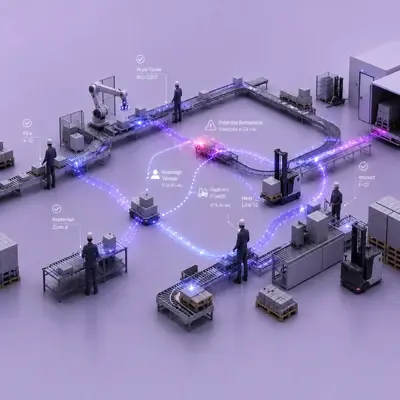
In an air cargo transfer hub, shipments unloaded from aircraft are sorted by hand onto pallets for their outbound direction. Courier and logistics hubs work in a similar way. At that scale, three different problems come together:
- Wrong pallet: a shipment goes onto the pallet for another direction and travels to the wrong destination.
- Left behind: a shipment is forgotten in the sorting area and misses its connection.
- Not cleared: a shipment sits on the right pallet, but its processing is not complete, so it must not leave yet.
Each of these turns into delays, rebooking, customer complaints and investigation time. The third one is the easiest to overlook: a hub may know exactly where a shipment is, but not whether it is allowed to go.
Traditional sortation checks and their limits
- Scanning each parcel: confirms identity at the moment of scanning, but not where the parcel is actually put down afterwards.
- Visual checks against a manifest: slow for a full pallet, and the more parcels there are, the easier it is to miss one.
- Re-scanning a finished pallet box by box: accurate but time-consuming, and the worker has to unpack or walk around the pallet.
- Handheld terminals: keep a hand busy while the worker is carrying cargo.
Each method covers one moment in the flow. Errors slip through the gaps between those moments.
How vision AI verifies sortation in four layers
In the air cargo deployment described on the solution page, the worker wears AXION together with a wearable barcode printer, and UWB location sensors sit next to the pallets. TIM INSPECT runs the image recognition and ties every shipment to its own record.
1. Give every shipment an in-hub identity
The worker scans the incoming barcode with AXION. The printer they wear issues a new sorting label valid inside the hub, and it goes on the shipment. From then on, the shipment is tracked under its own identity.
2. Catch the wrong pallet before the drop
Once the in-hub label is scanned, the target pallet is known. Scanning the pallet barcode, or the UWB sensors that detect which pallet the hand is approaching, confirm placement. If it is the wrong pallet, the glove vibrates and the worker turns to the right one before letting go.
3. Verify the pallet in a single image
The worker points AXION at the pallet and every label in the image is read at the same time. The system reports how many expected shipments were seen and marks missing, foreign and not-cleared shipments with a red frame on the image. The analysis runs on AXION.
4. Run a final check at the gate
The pallet is scanned and taken to the gate. Because its contents are known, the worker is warned before it leaves if anything is wrong, and the pass is recorded on video. If there is an error, the video shows which shipment is at fault.
The shipping status of each shipment comes from your system, which is how a shipment that cannot leave yet is flagged during pallet verification and at the gate. The solution page reports 100% accuracy and a speed-up of more than 70% in this deployment, based on the Thread In Motion project report.
What to plan for before rolling out
Map the flow and choose where to start
You do not have to switch on all four layers on day one. Look at your cargo flow and pallet layout, find where errors most often originate and start with that layer. The scope of each layer is planned around the flow and systems of the hub.
Label design and printing
In-hub labels are read both one by one and many at once in a pallet image. Make sure label size, position and print quality allow several labels to be read in one frame, and that labels face outwards when pallets are built.
Pallet layout and location sensing
UWB sensors need to be placed so that each pallet position can be told apart. Where pallets are moved often, barcode scanning of the pallet can be used instead or alongside.
Connection to shipping status
The "cannot leave" decision depends on data from your system. Agree which system holds the shipping status and how often it is updated, so the warning at the pallet and the gate reflects reality.
Video at the gate and privacy
Gate passes are recorded on video, which will include people. Define retention periods, limit access and inform employees, in line with the EU General Data Protection Regulation (GDPR) or the data protection law that applies to your site.
If your outbound flow is crate-based and leaves on forklifts through a fixed gate, shipment and crate verification uses fixed cameras at the gate instead.
FAQ
What is cargo sortation and pallet verification?
It is a set of checks that confirm hand-sorted shipments are on the right pallet, that pallets hold exactly what they should and that nothing leaves the hub uncleared. With TIM INSPECT it uses AXION, a wearable printer, UWB sensors and image recognition.
How is a pallet verified with a single image?
The worker points AXION at the pallet and every label in the image is read at once. Missing, foreign and not-cleared shipments are shown immediately.
What do the UWB sensors do?
They detect which pallet the worker's hand is approaching. If it is the wrong one, the glove vibrates before the shipment is put down.
Is this only for air cargo?
No. The deployment runs in an air cargo transfer hub, and the same structure can be used for manual sortation in courier and logistics hubs.
Next step
To review your cargo flow, pallet layout and shipping status data, request a demo and go through the cargo sortation and pallet verification layers with our team.


