


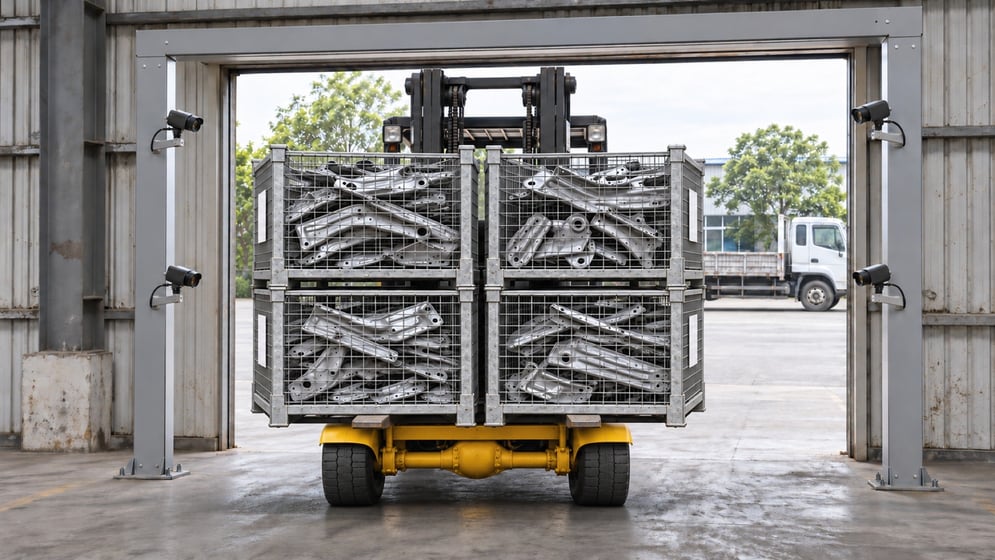
Shipping errors are prevented by checking the load where it actually leaves: at the exit gate, against the shipment list in your ERP. With vision AI, fixed cameras count the crates on a moving forklift, read every crate label and match both against the SAP shipment plan, so a missing, extra or wrong crate is caught before the truck closes its doors rather than at the customer's receiving dock.
This guide looks at why crate-level shipping errors are so persistent, where manual scanning falls short, and how shipment and crate verification with TIM INSPECT turns the loading gate itself into the checkpoint. It also covers what to plan for when you install cameras at a dock.
Why shipping errors still happen
A typical outbound shipment in automotive supply or manufacturing logistics is made up of dozens of returnable crates. Each one carries a label with a part or crate code, and the shipment is only correct when three things agree: the number of crates on the vehicle, the identity of each crate and the plan in the system. Any of the three can drift.
- One crate too many: a crate for another order or another customer ends up on the forklift.
- One crate missing: a crate is left in the staging lane while the system already shows the shipment as complete.
- The wrong crate: two crates look the same and only the label tells them apart.
Once an error passes the gate, it becomes a cost: extra transport, a short delivery at a customer who may run a just-in-time line, a claim to investigate and a stock record that no longer matches reality. And there is usually no evidence of what physically passed.
Traditional shipment verification and its limits
Most sites verify outbound loads with handheld terminals. The operator scans each crate label before or during loading, and the WMS or ERP compares the scans with the order. In principle this works. In practice it depends entirely on the person holding the scanner.
- Skipped scans: under time pressure a crate gets loaded without being scanned, or the same label is scanned twice.
- Manual entry: a damaged label leads to a code being typed by hand, and a typo is accepted as a valid read.
- Scan without count: scanning confirms the labels that were read, not the crates that physically left. A crate with no scan simply does not exist for the system.
- Extra handling: every forklift trip stops for a scanning step, which slows down the dock at exactly the busiest hour.
End-of-day counts find errors after the truck is gone. The dock needs a check that does not rely on someone remembering to do it.
How vision AI verifies shipments at the gate
In a crate verification setup built on TIM INSPECT, the gate does the checking. In the automotive supplier deployment described on the solution page, four fixed cameras watch the exit gate and the forklift passes without stopping. The flow has four steps.
1. The shipment plan comes from SAP
TIM INSPECT receives the vehicle information and the expected crate and product list from SAP. Every pass through the gate is linked to that shipment record, so the system knows what should leave before anything moves.
2. Wide-angle cameras count the crates
As the forklift drives through, wide-angle cameras count the crates on its forks from the image. Counting is independent of label reading, which matters: a crate with a missing or unreadable label is still counted.
3. Narrow-angle cameras read the labels
Cameras read the code on each crate label. TIM INSPECT compares the valid reads with the crate count and the SAP list. If four crates are counted but only three labels are valid, the pass is not verified.
4. Exceptions go to people, and SAP waits
An unlisted, missing or unreadable crate opens an exception. AXION, the wearable worn by the operator and the supervisor, gives a voice alert, and an alarm lights up at the gate. The correction and the repeat verification stay linked to the same event, and completion is only confirmed in SAP once every expected crate is verified and every open exception is resolved.
Each pass is stored with the crate count, the codes read, a photo and a short video. Expected, verified and missing crates sit on one screen, which gives you evidence when a customer questions a delivery. On the solution page, the deployment reports 30,000 shipments, 1.5 million crates read and 100% shipment accuracy, based on the Thread In Motion project report.
What to plan for when installing cameras at a loading gate
Camera positions and the gate layout
Counting and reading are different jobs, which is why the deployment uses wide-angle cameras for the load and narrow-angle cameras for labels. Plan positions around where labels face as the forklift passes, how high crates are stacked and the route forklifts actually take. A layout walk with sample crates is the fastest way to find blind spots.
Lighting and label quality
Doors open and close, daylight changes and forklift headlights shine into the lens. Stable, even lighting at the gate makes reading more reliable. Check label condition in advance too: worn or dirty labels will correctly show up as exceptions, but you want that to be rare.
Integration with SAP and your shipment workflow
Decide early which record defines the expected load, how exceptions are handled and who is allowed to close them. The value of the system comes from the two-way link: the plan comes from SAP and the verified exit goes back to it.
Privacy and people in the frame
Gate cameras will capture forklift drivers. Point cameras at the load rather than at people where possible, define retention periods for photos and video, and inform employees. Under the EU General Data Protection Regulation (GDPR) and similar laws, the purpose of recording and who can access it should be documented before go-live.
One gate first, then more
The described project runs at one gate. The same approach can be planned across several connected gates, but starting with one lets you tune positions and exception handling before scaling. If your outbound flow is pallet-based rather than crate-based, four-side pallet scanning reads the labels on all four sides of a pallet in one pass.
FAQ
What is shipment and crate verification?
It is the automated check that the crates leaving a gate match the shipment plan in count and identity. With TIM INSPECT, fixed cameras count and read the crates and the result is matched with the SAP shipment list.
Does the forklift have to stop at the gate?
No. In the deployment described, the forklift is not stopped and does not wait for manual scanning; verification happens while it moves. SAP completion stays blocked until any mismatch is resolved.
Does the system count the parts inside each crate?
No. This application verifies at crate level, matching crate counts and labels with the shipment list. Counting parts inside a crate is a separate inspection scope.
What happens if a label cannot be read?
An unreadable or missing label creates an exception. If the crate count and valid reads do not match, the pass is not verified, and the correction and repeat check are tracked in the same record.
Next step
If you want to see how this would fit your crates, labels and gate layout, you can request a demo and walk through the shipment and crate verification flow with our team.


