



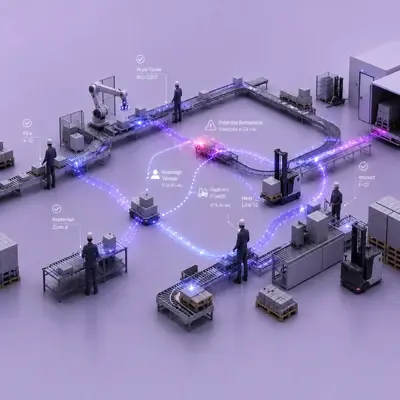


Blocked emergency exits are one of the most common findings in safety audits, and the reason is simple: a pallet left in front of an exit door is rarely noticed until someone walks the floor with a checklist. Vision AI keeps exit routes clear every day by watching the zones that must stay free, detecting when material is left there and alerting the person who left it on their wearable. The Emergency Exit & Route Monitoring solution page shows how alerts and records work.
This guide explains why obstructed exits keep coming back, how camera-based exit monitoring works and what to settle before you switch it on.
Why blocked exits and access routes are a recurring problem
In a busy warehouse or plant, the space in front of an emergency exit, a fire cabinet or an electrical panel looks like free floor. A forklift operator under time pressure drops a pallet there "for a minute", a stack grows a little taller than allowed, and by the end of the shift the route is partly blocked. In an emergency, those minutes and centimetres matter.
Fire safety rules treat exits as a basic requirement. UK government guidance on workplace fire risk assessments, for example, lists emergency routes and exits among the first things a responsible person must consider. Most sites have the rule; what they lack is a way to see when it is broken between audits.
How exit routes are checked today
- Housekeeping audits: a supervisor or safety specialist walks the site with a checklist. Obstructions are found on audit day, often long after they appeared.
- Floor markings and signs: yellow hatching and "keep clear" signs help, but they do not stop a pallet being left on them.
- Fire drills: they show whether people know the route, not whether it is clear on an ordinary Tuesday afternoon.
- Reporting by colleagues: people notice, but rarely know who left the material or feel it is their job to raise it.
The result is a pattern familiar to every safety team: the same exits blocked again and again, with no record of how long or how often.
How vision AI keeps emergency exits clear
On the TIM INSPECT platform, emergency exit and route monitoring uses fixed cameras and follows four steps:
- Define the zones to keep clear. Emergency exits, fire cabinets, panel fronts and walkways are marked as zones in the camera view.
- Detect a blocked zone. When material is left in a defined zone, or a stack rises above the allowed height, the system detects it.
- Alert the person concerned. The forklift operator who left the material is alerted right away on AXION, TIM's wearable physical AI device, for example: "Exit route blocked. Move the pallet out of the zone." If the obstruction stays beyond the set time, the area supervisor is notified and a task is opened.
- Report the duration. How long the zone stayed blocked is added to the nonconformity record and appears in housekeeping audit reports.
The scope covers material left in front of emergency exits, fire cabinets and panels, obstructions on walkways, stacks above the allowed height and irregular stacks at risk of toppling. The system does not stop the forklift; it alerts and records.
Tolerance for real-world operations
Not every drop is a violation. During loading, material may sit in a zone for a short time. A tolerance period is therefore defined per zone, so brief, temporary drops are not counted as nonconformities. The period is agreed during setup based on how each zone is used.
From alerts to better layout
Each record shows which zone was blocked, when, who was alerted and how long it took to clear. Over a few weeks you see which zones are blocked most often, and the reason usually becomes obvious: a staging area that is too small, a route that is the shortest way to a dock, a shelf location that fills up at shift change. Layout and material flow can then be adjusted based on concrete records rather than impressions.
What to settle before installation
Camera coverage of exits and routes
The camera needs a clear view of the floor in front of each exit door, fire cabinet and panel, and of the walkway sections you want to protect. Start by listing the zones, then check which existing cameras already see them.
Zone sizes and tolerance periods
Zones should match the space that must stay free, not the whole aisle. Agree tolerance periods per zone: a fire cabinet may need zero tolerance, while a walkway next to a loading area may allow a short wait.
Who gets the alert and the task
Agree how the alert reaches the operator who left the material and who the area supervisor is for each zone. Escalation only works if the next person in line is clearly defined.
Privacy
The system watches the defined zone and what happens in it, not who a person is. Images are filtered and nothing but the event moment is kept; privacy is planned at setup following GDPR and KVKK requirements.
Connect exit monitoring to fire safety
Clear exits are one part of fire readiness. If you are also reviewing early warning, Fire & Smoke Early Warning evaluates visible flame and smoke signs on camera feeds and notifies the relevant team.
FAQ
Do short, temporary drops count as a nonconformity?
No. A tolerance period is defined for each zone, so short waits during loading are not counted.
Which situations can be monitored?
Material in front of exits, fire cabinets and panels, obstructions on walkways, stacks above the allowed height and irregular stacks at risk of toppling.
Who gets the alert?
The operator who left the material, on AXION. If the obstruction remains beyond the set time, the area supervisor is notified and a task is opened.
Does the system track workers' identities?
No. It watches zones and events, not people, and keeps only the event moment.
Next step
To define the zones that must stay clear and agree on tolerance periods for your site, request a demo; the solution page walks through each situation in detail.


